Top up your balance
Plans and billing · Updated 23 November 2026 · 1 min read
Add Taka to your LaCommerce balance to pay for your plan.
Plans are paid from your balance, in Taka. The balance belongs to you, not to one store, so it pays for all your stores. It can't be withdrawn.
Top up
Select Balance in the top bar (or Settings › Wallet).
On Top up, type the Amount (৳).
Choose How you paid: bKash (send money), Nagad (send money) or Bank transfer. The screen shows the number or account to send to.
Send the money first. Then fill in the Transaction id and The number you sent from. They're optional, but help us confirm faster.
Select Send top-up request.
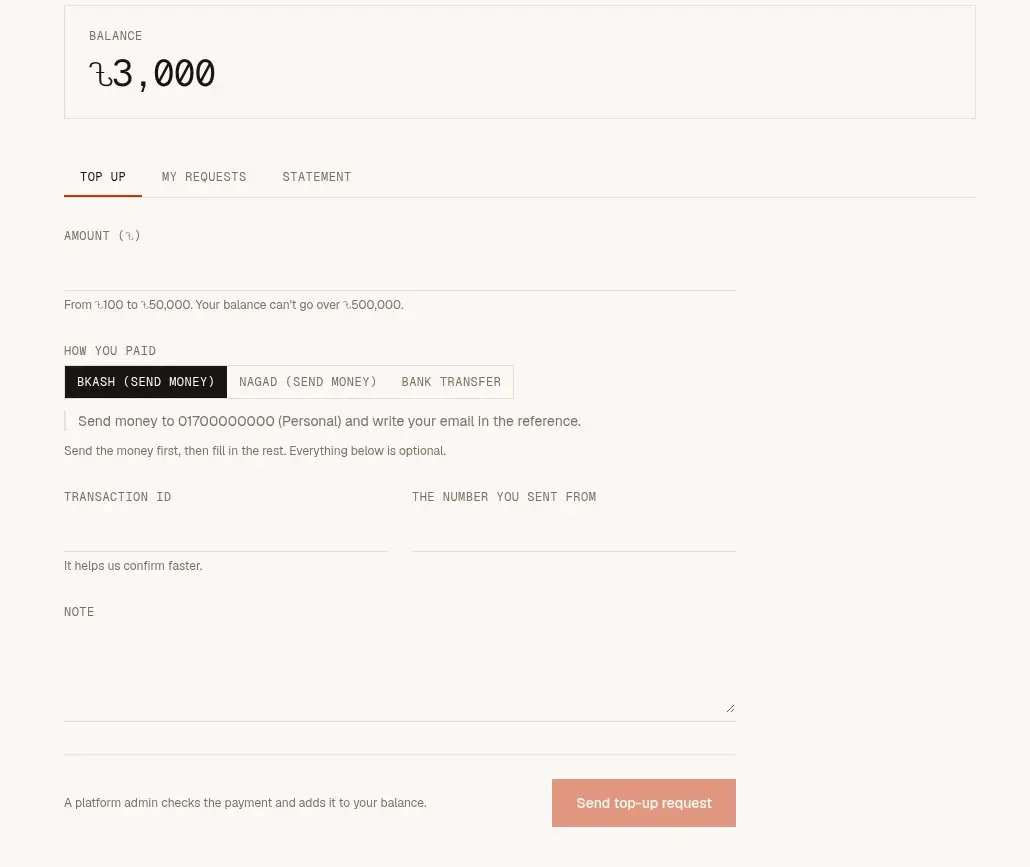
A platform admin checks the payment and adds it to your balance. You get a notification when it's approved. Follow your requests in My requests: Waiting for approval, Approved, Rejected (with the reason), Cancelled or Expired.
Limits
Each top-up must be between the minimum and maximum shown under the amount, and your balance can't go over the cap shown there.
Statement lists every change to your balance: top-ups, plan payments, and the balance after each.