Tour of the dashboard
Getting started · Updated 23 November 2026 · 2 min read
Where everything is, and what the numbers on the home screen mean.
The dashboard is where you run your store. Here is what each part of the screen does.
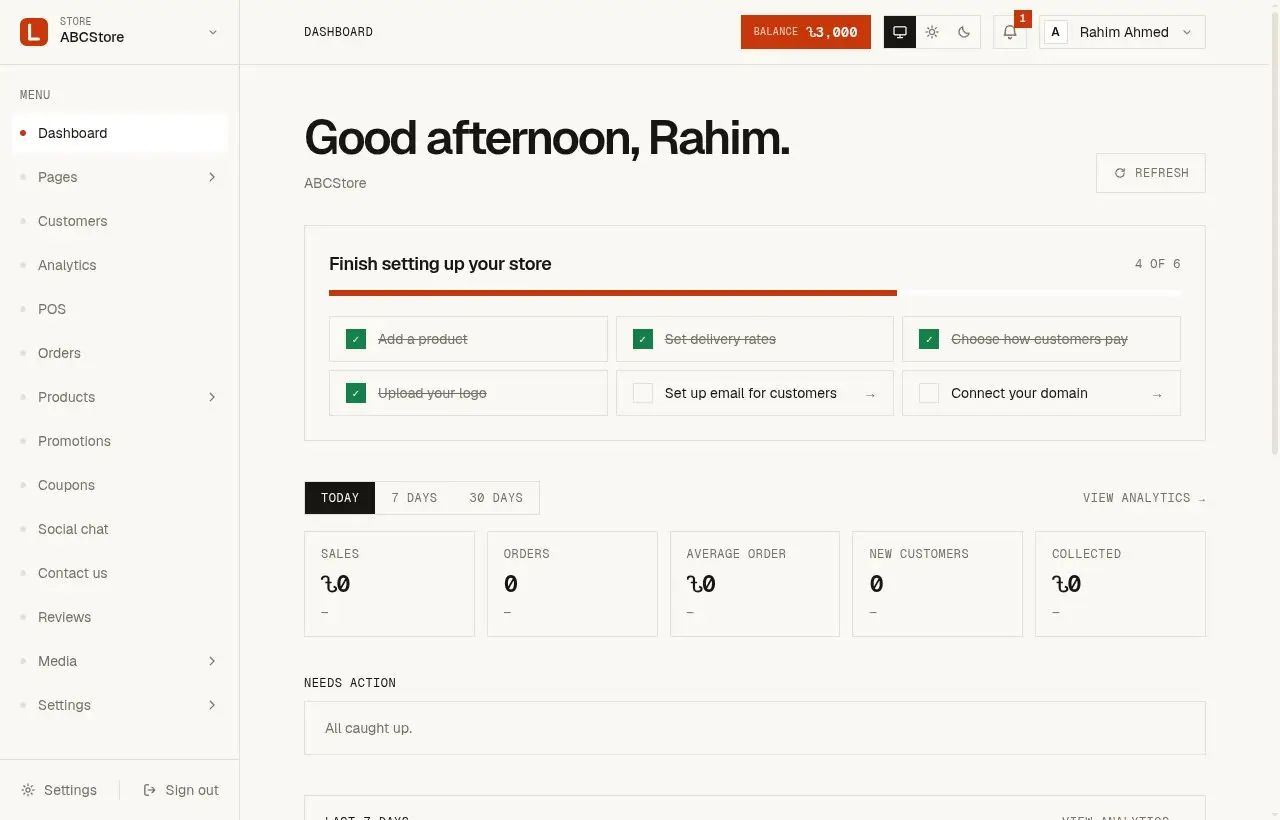
The top bar
- Store switcher (top left): shows the store you're working in. Select it to move to another of your stores.
- Balance: your LaCommerce balance in Taka. Select it to top up.
- Theme buttons: system, light or dark look for the dashboard (not your store).
- Bell: notifications, like new orders, low stock and plan reminders.
- Your name: your profile, password and security.
The menu
| Menu item | What it's for |
|---|---|
| Dashboard | Today's numbers and what needs action |
| Pages | Your store's home page, look (Customize), pages, menus and blog |
| Customers | Shoppers who signed up, and ones your team added |
| Analytics | Sales, products, orders, customers and marketing reports |
| POS | Make an order for a walk-in, phone or social media customer |
| Orders | Every order: confirm, ship, deliver, refund |
| Products | Products, categories, brands, attributes, inventory and landing pages |
| Promotions, Coupons | Sales and discount codes |
| Social chat | Facebook and Instagram messages and comments |
| Contact us, Reviews | Messages from your contact form, and product reviews |
| Media | Your images and documents |
| Settings | Shop details, delivery, payment, checkout, tracking, SEO and more |
The Settings link at the very bottom opens your own account settings (profile, password, security, wallet, notifications) and the store's (general, plan and usage, team, domains, history).
The numbers on the home screen
- Today, 7 days, 30 days: choose the period for the cards below.
- Sales, Orders, Average order, New customers, Collected: each compared with the period before.
- Needs action: orders to confirm, orders to ship, couriers that need attention, cash to collect, refunds owed, out-of-stock and low-stock variants, new messages and reviews to approve. Select a card to open the list.
- Recent orders, Best sellers and Running promotions.
Good to know
The numbers are kept for about a minute. Select Refresh to work them out again. "Today" is a Bangladesh day.