Cards with SSLCommerz
Payments · Updated 23 November 2026 · 1 min read
Take card and mobile banking payments through SSLCommerz.
SSLCommerz lets customers pay with Visa, Mastercard, Amex, internet banking and mobile banking wallets, on one payment page.
Before you start
You need an SSLCommerz merchant account. SSLCommerz gives you a store ID and a store password for it.
Connect SSLCommerz
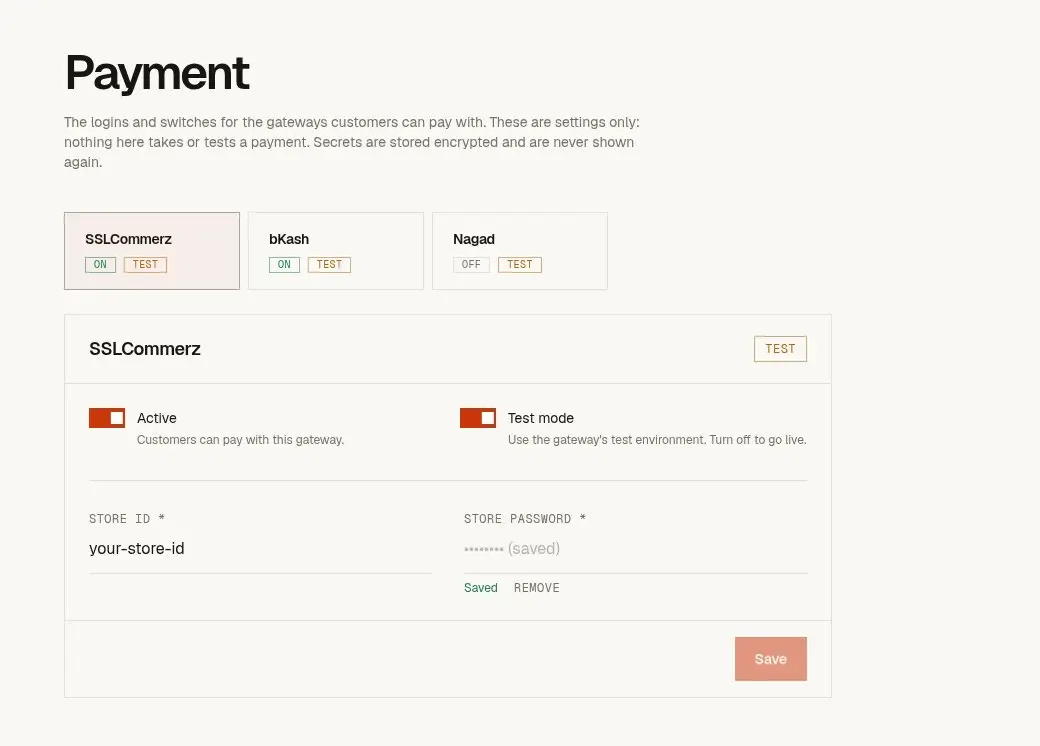
Go to Settings › Payment and open the SSLCommerz tab.
Fill in Store ID and Store password.
Turn off Test mode to take real payments. Leave it on only while you try SSLCommerz's sandbox details.
Turn on Active and select Save.
Test mode
With Test mode on, payments go to SSLCommerz's test system and no real money moves. Don't leave it on after you launch.
Common questions
Who on my team can change this?
Only people allowed to edit payment gateways. Others can see the page but not change it.
How do I refund a card payment?
Refund it in the SSLCommerz merchant panel first, then record it on the order as Through the gateway. See Refund an order.